Most of making a lead magnet is not the lead magnet
You can automate almost everything around a lead magnet: the design, the landing page and form, delivering the PDF, and tracking who read it. What you cannot automate is the content, meaning what you know and what you think. Those two steps used to get whatever time was left. Now they can get most of it.


The list nobody shows you
Everyone agrees lead magnets work. Most agencies and startups still do not have one, or have one from 2023 that nobody has touched since.
It is not because they have nothing to say. It is the list. Here is everything that sits between “we should write a report” and the first lead, and who can do each step today:
- You
Decide what you know that others do not
Your data and your experience: results, process, expertise.
- AI
Find the pattern in it
ChatGPT or Claude reads the export and proposes findings.
- You
Judge what is true and worth saying
Check the numbers. Add the example and the opinion.
- AI
Outline and draft
From your findings, then rewritten by you.
- Unplain
Design it in your brand
Cover, contents, tables, CTA page. Again after every change.
- Unplain
Build a landing page and form
With a preview of what is inside.
- Unplain
Deliver it to every sign-up
By email, with a note to you about each lead.
- Your email tool
Follow up
Kit, Mailchimp or HubSpot, fed by CSV or webhook.
- Unplain
Measure what worked
Visits, leads, and what each reader read.
Look at where the hours used to go. Designing in Canva or InDesign. Wrestling a landing page builder. Wiring up delivery. Then nobody measuring anything. The two steps that make the lead magnet worth an email address got whatever time was left.
This post is about the other seven: why they were so slow, and what they look like now. I built Unplain to take most of them off your plate, so read it with that in mind.
Then and now
I have laid out more lead magnets by hand than I care to admit. Here is what each step used to involve, and what it involves today.
| Step | How it used to go | How it goes now |
|---|---|---|
| Design | Brief a designer and wait, or fight a template page by page until the spacing looks right. | Paste the draft. The cover, contents, brand and CTA page come back designed. |
| Edits | Every changed number means reopening the design file and checking nothing moved. | Change the text. The layout follows. |
| Landing page | A page builder, a form tool and somewhere to host the file, wired together. | A Library page with a preview and a form, or embedded on your own site. |
| Delivery | An autoresponder set up just to send one download link. | Every sign-up gets the PDF by email. |
| Measuring | A download count, and silence once the file leaves your site. | Visits, leads and what each reader read, if they allow it. |
| Next edition | Start the design again. | Update the document and refresh the published guide. |
None of the old way was hard, exactly. It was slow, it needed three or four tools, and every change rippled through all of them. So the lead magnet got made once and then left alone.
Design was the bottleneck
A twenty-page report is not one design decision. It is hundreds: margins, heading sizes, where tables break, what the contents page says, what the last page asks for. In a design tool you make each of them by hand, and you make them again when the text changes.
Unplain makes them for you, from your Brand Theme: your logo, colours and fonts, set once. Bring the draft as Word (.docx), Markdown (.md), plain text (.txt), pasted text, or a link to a public web page, or create it straight from Claude through Unplain’s MCP server, which works with Claude, Claude Code and Codex (how it works). That is the promise in one line: a fully designed, branded 20-page lead magnet in 5 minutes.
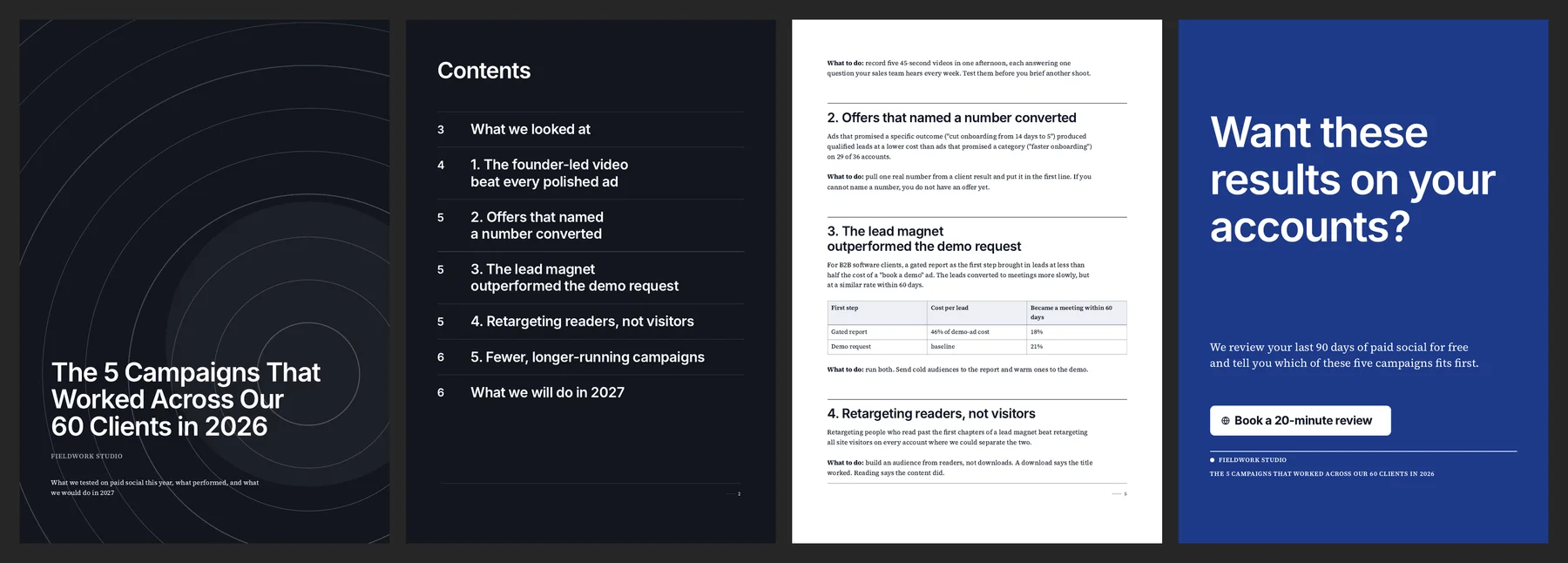
That report is made up, and so is the agency on its cover. The layout is exactly what Unplain produced from a plain draft.
The landing page used to be three tools
A builder for the page. A form tool that talks to your email list. Somewhere to host the PDF. Then a zap to glue them together, and a test sign-up to check the glue held.
In Unplain, publishing a guide gives it a Library page: the chapters and a look inside on one side, a short email form on the other, with a consent sentence you write yourself. If your audience is already on your website, embed the whole Library there, or one guide with its form.
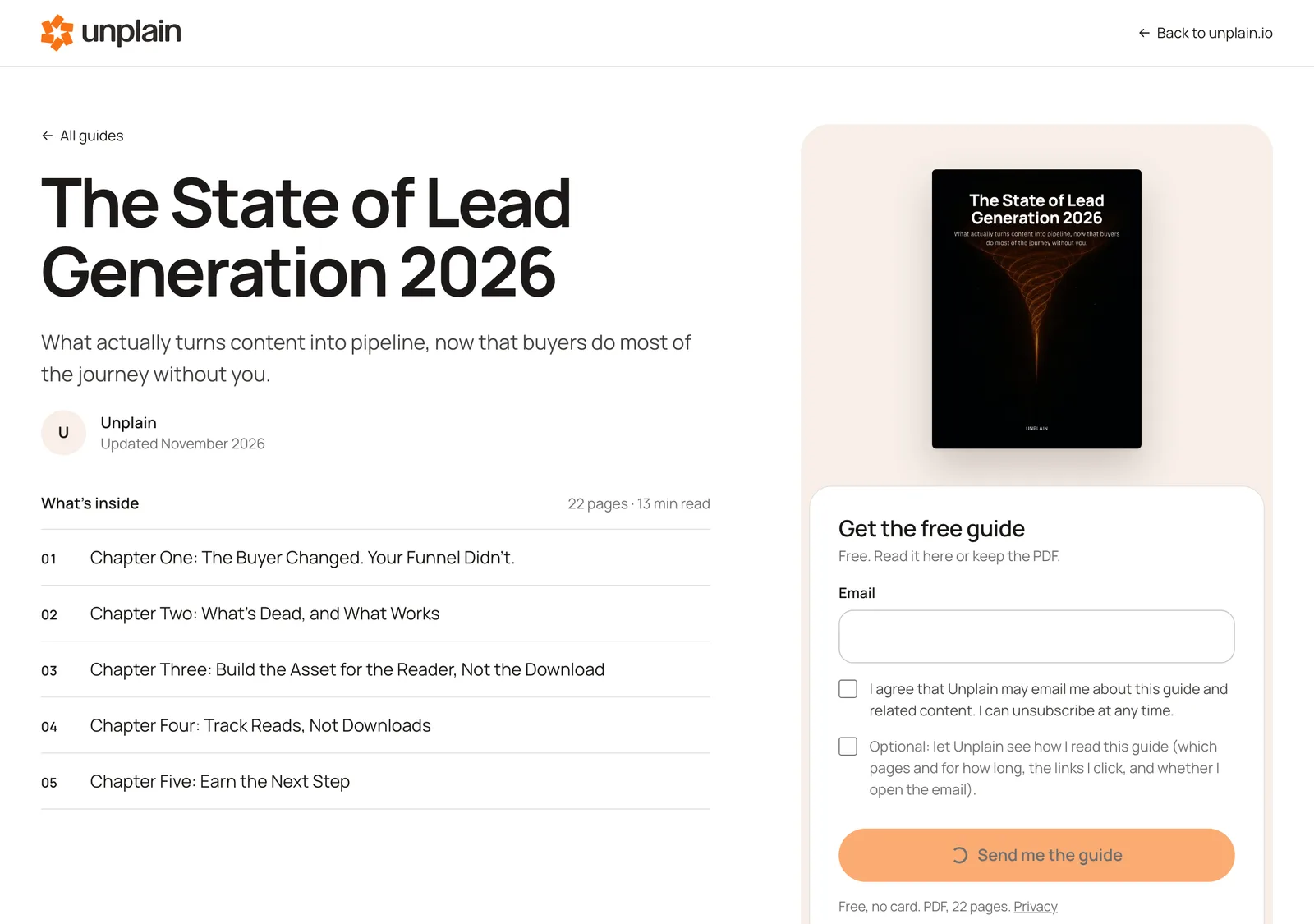
Each sign-up gets the PDF by email, and you get a note about the new lead.
Nobody measured reading
Once a PDF is downloaded, it is gone. You know the title worked. You have no idea whether anyone got past page two.
That matters more than it sounds. The leads worth calling are the ones who read. On a Library page, a reader can tick an optional box, off by default, to share how they read: which pages, for how long, and which links they clicked. Add UTM parameters to the links you share, which are kept with each lead, and you know which post, newsletter or ad brought in the readers and not just the downloads.
Free includes 1 live guide and 10 leads a month. Growth removes both limits for $49 a month.
What still takes your time
Three things, and they should.
The content. Your data, your experience, and the judgement about what is true. That is the whole value, and it has its own guide: how to make a lead magnet with AI from your own data.
The follow-up. Sequences live in your email tool. From Unplain, leads go out by CSV or webhook today, and Zapier or Make can pass the webhook on. Direct connections to Kit, Mailchimp and HubSpot are coming.
Distribution. No tool posts for you. Each finding is a LinkedIn post. Each chapter is a newsletter. The report is what they all link to.
The honest limits
Unplain makes PDFs, on purpose, so a calculator or a quiz needs another tool. The Library cannot sit on your own domain yet, though you can embed it on your site today.
The lead magnet is what you know. Everything else is operations, and operations are no longer the reason to put it off.