How to make a lead magnet with AI: start from the data only you have
Start from what only you have: your campaign results, your product analytics, the way your team actually works. Give that data to ChatGPT or Claude and ask it to find the pattern worth a report. Then hand the rest (design, publishing, the form, delivery and tracking) to tools, and spend your time on the findings.


Why most AI lead magnets bring in nobody
Every agency has the same lead magnet ideas: a guide to Meta ads, a checklist for landing pages, “10 email subject lines that convert”. Anyone can make those in a minute with ChatGPT, which is exactly why nobody trades an email address for them.
You have something else. If you run campaigns for 60 clients, you have a year of results nobody else has seen. Which creatives carried the accounts. Which offers converted. Which channels quietly died. That is a report called “The 5 campaigns that worked across our 60 clients in 2026”, and only you can write it.
It also sells better than a guide. A prospect reading it learns what to try, and learns that you have tried it 400 times.
-
Your data
Your accounts, your tests, your results. A model cannot generate it.
-
Your experience
What your team learned running them: what you would do again, and what you never would.
-
It starts the call
The reader finishes with a question only you can answer.
Your best lead magnet is already in your data and experience
A startup has the same thing, often more of it. Your product runs the service your customers pay for, thousands of times a month, and you can see what happens.
- An email marketing startup sees which subject lines, send times and sequence lengths get opened and clicked across every account on the platform. “What 2 million sends taught us about welcome sequences” is a report its customers’ competitors would pay for.
- A scheduling tool knows which booking pages get the most meetings and which questions on the form make people abandon it.
- A design or document tool knows which templates get finished and which get started and dropped.
Then there is the experience your team has that is not in any dashboard. How you ship. The tools in your stack and what each one replaced. The pricing page you rewrote three times and what changed each time. “The AI stack we use to ship a feature a week” is specific, true and useful to every founder one year behind you.
-
Your product's data
Aggregate results across your customers: what performs, what does not.
-
Your niche expertise
What you know about the problem your product solves, from solving it every day.
-
How your team works
Your stack, your process, the experiments you ran on yourselves.
The rule is the same for agencies and startups. Take what you already know from doing the work, and write it down with the evidence.
One small thing before you start: you know your clients and your own terms better than anyone, so share what you are comfortable sharing. Totals across many accounts usually tell the story better than any single one anyway. And keep the raw numbers to hand, because a curious reader will ask where a finding came from.
Let AI find the pattern
This is where AI earns its keep. Export the data you can share and ask the model to read it the way an analyst would.
Campaign results come out of every ad platform as CSV. Product analytics can come straight from the source: PostHog runs a hosted MCP server that Claude can connect to, so Claude can query your PostHog data directly instead of you exporting it (PostHog’s docs, checked 11 November 2026). PostHog AI, inside PostHog, answers the same kind of question if you would rather stay there.
What you hand over can be as plain as this: one row per campaign, clients replaced by a code.
campaigns-2026.csv
| Client | Sector | Creative | Offer | Weeks live | Cost per qualified lead vs. client average |
|---|---|---|---|---|---|
| C-014 | B2B software | Founder video | Specific number | 9 | -41% |
| C-022 | Ecommerce | Studio ad | Category | 3 | +12% |
| C-031 | B2B software | Static image | Gated report | 8 | -27% |
| C-047 | Services | Founder video | Category | 6 | -18% |
| C-052 | B2B software | Studio ad | Demo request | 2 | +9% |
Here are this year’s results from the campaigns we ran for our clients, anonymised, one row per campaign. Find the five patterns that best separate the campaigns that performed from the ones that did not. For each, show the numbers behind it, say how confident you are, and tell me what a reader should do differently because of it.
Ask for the numbers behind every pattern, then check them yourself. Models are good at spotting a pattern and just as good at inventing one. The findings you keep become your chapters.
Write it around the findings
Now let AI draft. Give it the findings, who the report is for, and how long it should be, and ask for an outline first. Fix the outline before any prose. Moving a chapter is cheaper than rewriting one.
A structure that works for data-led lead magnets:
- What you looked at and how much of it: how many clients, campaigns or months.
- One chapter per finding: the result, the numbers, an example, what to do about it.
- What you would do next year.
- Who you are and how to talk to you, on the last page.
Then rewrite the draft in your own words. The model writes fluent, slightly empty sentences. Your job is to put back the example, the opinion and the client who did it wrong first. Then read each paragraph and ask: could another agency have written this without your data? If yes, it is filler. Cut it, or replace it with one of your own examples.
Check every number
If the draft says something you did not give it, such as “industry studies show 73%”, find the source or delete the sentence. One made-up number is enough for a reader to stop trusting your real ones.
Hand the rest to tools
Here is the uncomfortable part. Once the findings are written, most of the work of a lead magnet is still ahead of you, and none of it is the valuable part. This is the whole job, and who can do each step:
- You
Pick the data and experience to share
Campaign results, product analytics, how your team works.
- AI
Find the pattern
ChatGPT or Claude reads the export and proposes findings with numbers.
- You
Check the findings and add your judgement
The examples, the opinion, the part nobody else could write.
- AI
Draft and outline
From your findings, not from the open web.
- Unplain
Design: cover, contents, brand, CTA page
And again every time a number changes.
- Unplain
Landing page and email form
A Library page with a preview of what is inside.
- Unplain
Send the PDF to every sign-up
Plus a note to you about each new lead.
- Your email tool
Follow-up sequence
Kit, Mailchimp or HubSpot, fed by CSV or webhook.
- Unplain
Count visits, leads and readers
Including what each reader read, if they allow it.
I built Unplain to take that list off your plate, so read the next three sections with that in mind. The point of the whole exercise is that your time goes into the findings. The rest should take an afternoon at most.
Design it without opening a design tool
Bring the draft as Word (.docx), Markdown (.md), plain text (.txt), pasted text, or a link to a public web page. Unplain designs it: a cover, a contents page, page numbers, your Brand Theme with your logo, colours and fonts, and a CTA page at the end that tells the reader what to do next. It never rewrites your words. When a number changes, you change the number and the layout follows.
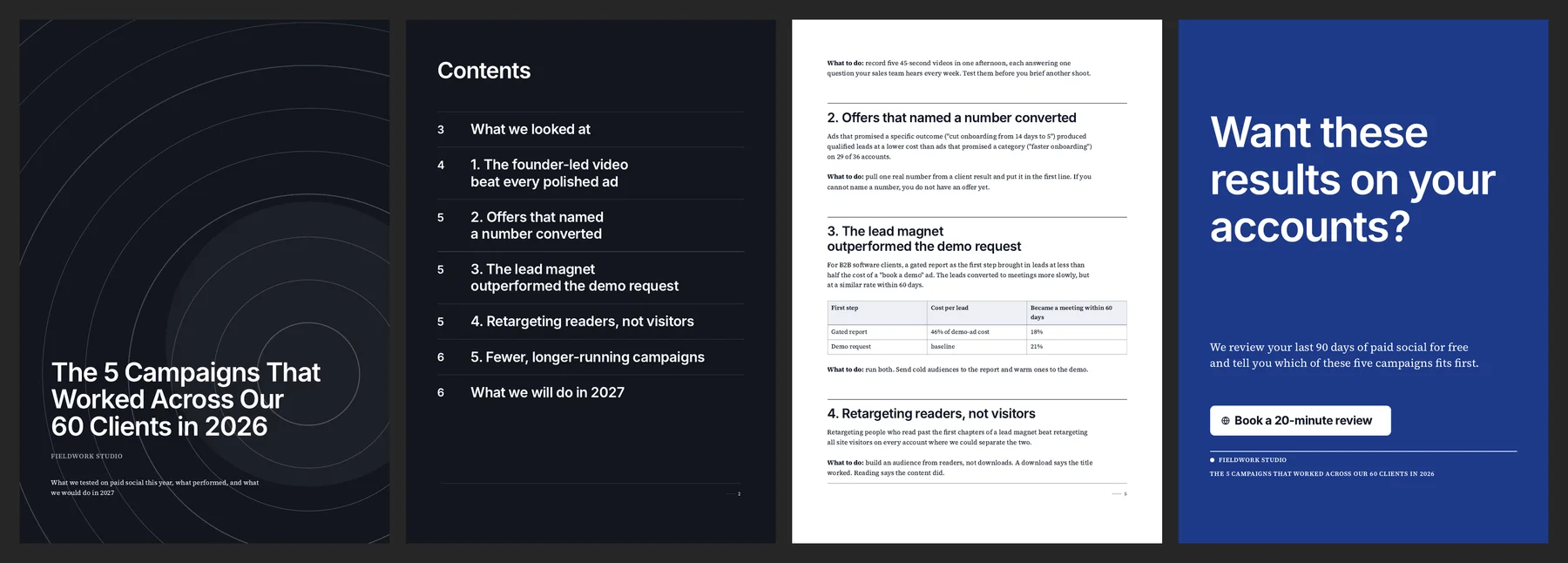
That is the dummy agency report from the data above, made in one go with Unplain’s Executive preset: cover, contents, the findings with their tables, and a CTA page asking for a call. Fieldwork Studio does not exist; the layout is exactly what Unplain produced.
If you already work in Claude, you do not need to leave it. Unplain’s MCP server works with Claude, Claude Code and Codex, so the same conversation that found your patterns can create the designed document.
A PDF of up to 10 content pages exports free, and the cover, contents and CTA page do not count toward that. If your lead magnet is one visual page, Canva is the better tool (where each one fits).
Publish it behind a short form
Every field on a form costs sign-ups. Ask for an email address and a clear consent line. A company name if you will really use it. Show what is inside before the form: the title, the chapters, the page count, a page or two.
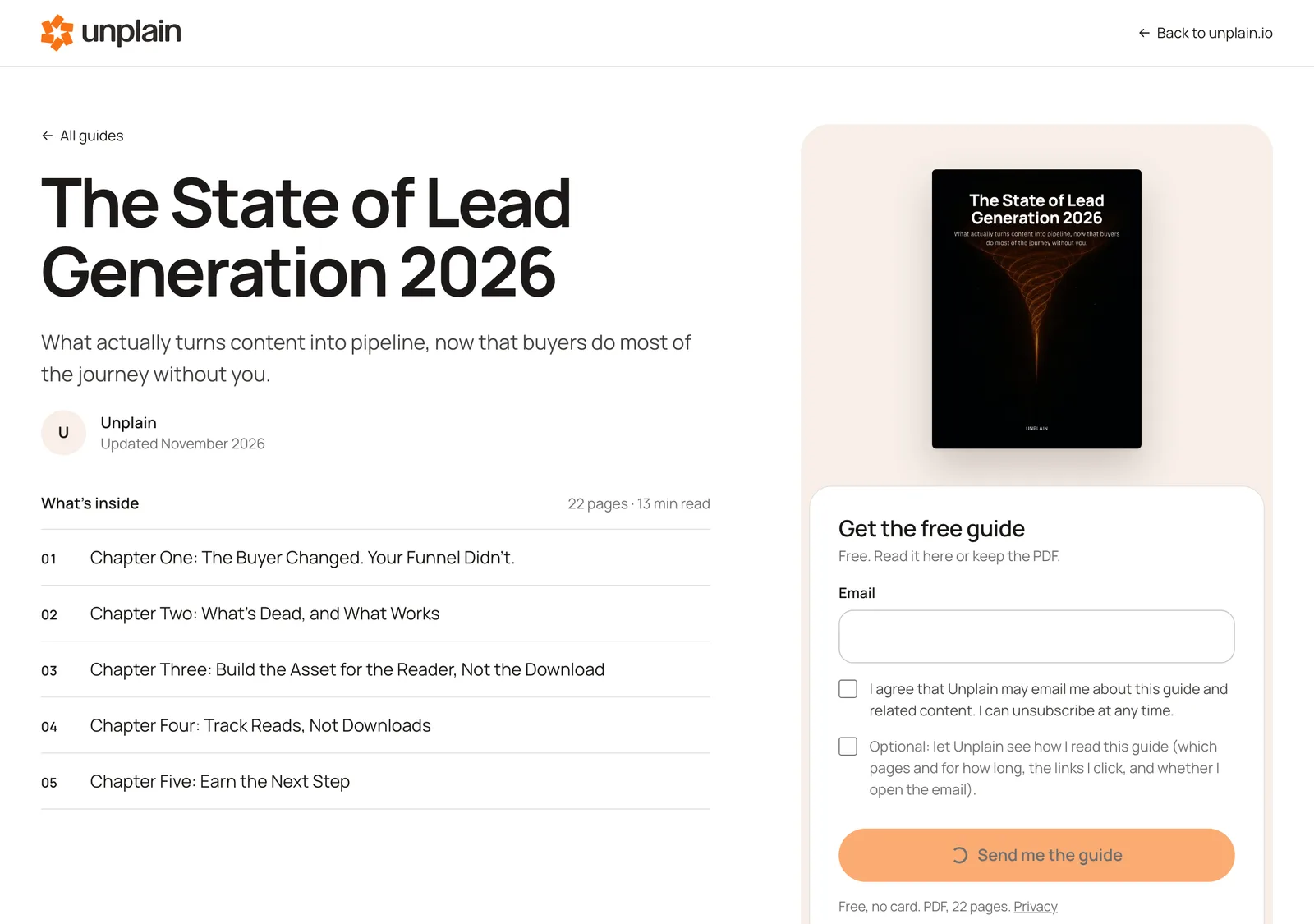
That is our own lead magnet on guides.unplain.page. In Unplain, a guide you design is published on a Library page like this one, with the chapters and a look inside next to the form. You write the consent sentence yourself. And you do not have to send people to Unplain: embed the whole Library, or one lead magnet with its form, on your own website.
Follow up on what they read
When someone signs up, Unplain emails them their copy and sends you a note about the new lead. That covers delivery. The follow-up sequence itself lives in your email tool: Kit, Mailchimp or HubSpot. Today you get leads there by CSV or by pointing Unplain’s webhook at your own server, or at Zapier or Make. Direct connections to those three are coming and not live yet.
What Unplain adds is what to say. A reader can tick an optional box, off by default, to let you see how they read: which pages, for how long, and which links they clicked. Someone who spent four minutes on your chapter about creative testing wants a different email from someone who closed the guide on page two.
Free includes 1 live guide and 10 leads a month. Growth removes both limits for $49 a month.
Measure reads, not downloads
Count three numbers per lead magnet:
- Visits, by source. Tag every link you share with UTM parameters, which Unplain records with each lead.
- Leads, divided by visits. Low means the title, the preview or the form.
- Readers: leads who read past the first pages. Low means the findings.
I will not quote you a “good conversion rate”. It depends too much on where the traffic comes from. Measure your first month, then beat it.
Where this goes wrong
- The report is about you. Your story belongs on the last page. The findings go first.
- The numbers do not hold up. Check every one against the raw data before it ships.
- It never changes. Next year’s data is next year’s edition. Update it and tell your list.
And the honest limits of what I make: Unplain makes PDFs, on purpose, so a calculator or a quiz needs another tool. The Library cannot sit on your own domain yet, but you can embed it, or a single lead magnet and its form, on your website today. Direct connections to Kit, Mailchimp and HubSpot are coming; until then, leads leave by CSV or webhook.
Your data and your judgement make the lead magnet. Everything after that is formatting, and formatting is not where your time should go.