Unplain MCP
Connect Unplain to Claude Code
One command, and Claude Code can create and export designed PDFs in your Unplain account. Write the analysis in the terminal, get back a document with a cover, a contents page and your branding on it, and never open an editor.
Two minutes if you already have a key. Works on the free plan.
Get a key
Account settings, API keys, Create. Name it "Claude Code" so you can revoke this one without disturbing anything else you have connected. You only see the key once, so paste it into the command in step 2 while it is still on screen.
Open Account settingsMore on what a key can do and how to revoke it in the overview.
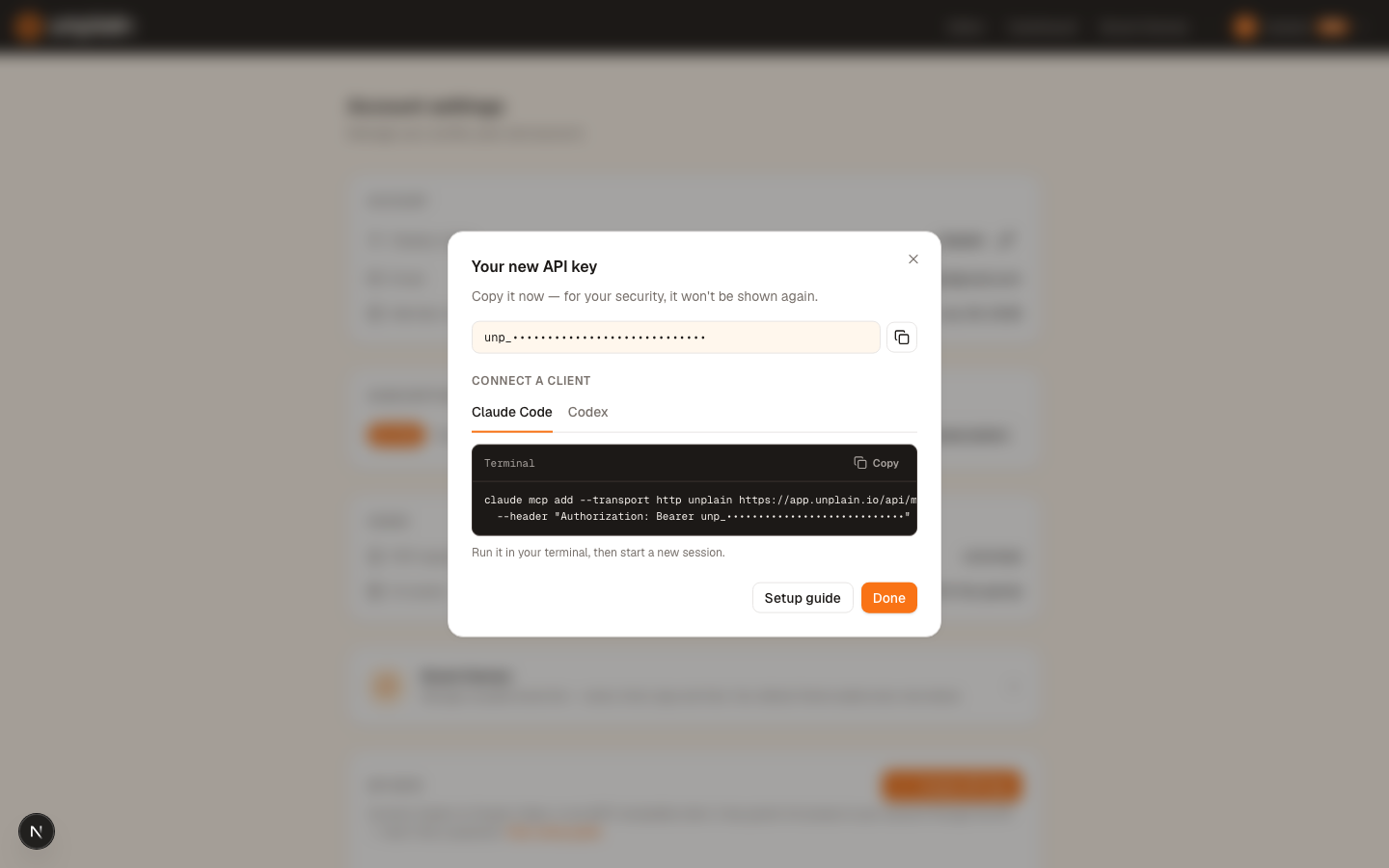
Add the server
Run this with your own key in place of the placeholder. The key is passed as a header on the add command, so it goes straight into Claude Code's own configuration rather than a file you manage.
claude mcp add --transport http unplain https://app.unplain.io/api/mcp \
  --header "Authorization: Bearer unp_your_key_here"
That is the whole setup for one person. Adding -s project to the command writes this file in the project root instead of configuring the server just for you. Claude Code asks each teammate to approve the server the first time they open the project.
{
  "mcpServers": {
    "unplain": {
      "type": "http",
      "url": "https://app.unplain.io/api/mcp",
      "headers": {
        "Authorization": "Bearer unp_your_key_here"
      }
    }
  }
}
Do not commit a real key
The Authorization header in that file is a live credential. Commit it with a placeholder and have each teammate substitute their own, or keep the file untracked and share the command instead. Everyone needs their own key regardless: an Unplain key acts in the account it belongs to.
Check it worked
claude mcp listUnplain should come back as Connected. Inside a Claude Code session, /mcp shows the same thing.
Then prove it end to end with something harmless, before you ask it to build anything:
List the Brand Themes in my Unplain account and tell me which one is the default.Claude Code will ask permission to use an Unplain tool. Allow it, and you should get your themes back. An empty list is still a success: the connection is live, you simply have not saved a theme yet.
What this is actually for
Claude Code is already sitting in your repository with your data in reach. The reason to connect Unplain is that the last mile, turning what it found into something you can send, is the part that normally costs you an afternoon.
Analyse the churn data in ./data, write it up as a report with an
executive summary, three findings and a recommendation, then create it
in Unplain using my "Main brand" theme and export the PDF.
Two habits make the output consistent across a series of these. Save a Brand Theme before the first document rather than after the third, so every later report inherits it without anyone re-specifying anything. And give Claude the document structure, not just the topic: a named set of sections produces a contents page worth having.
If you run this often, put a line in your CLAUDE.md saying which brand theme to use and when to reach for Unplain. It stops
you repeating the same instruction in every session.
The full list of what your assistant can do, the prompt library and the plan limits live on the Unplain MCP overview. For the wider question of how this compares to having Claude Code render a PDF itself, see generating branded PDF reports from Claude Code.
When it does not work
The Unplain tools do not show up
Claude Code picks up new servers when a session starts, not while one is running. Quit the session you had open and start a new one, then ask what Unplain tools it has.
claude mcp list says the server failed
Almost always the key. Check that the header value starts with "Bearer " (with the space) before the key, that the key has not been revoked, and that the URL ends in /api/mcp with no trailing slash. A bad key returns a 401, which Claude Code reports as a failed connection rather than an auth error.
A teammate cannot see the server after pulling .mcp.json
Claude Code asks each person to approve a project-scoped server the first time they open the project, and it stays inactive until they do. Ask them to run /mcp in a session and approve Unplain. They also need their own key: the one in the committed file is whoever set it up.
It asks me for a project ID
It should not need one. Ask it to find the ebook by name instead, for example "find my Unplain ebook about carrots". If it keeps asking, it is running an older tool list, so start a new session.
Errors that are not specific to Claude Code, such as export length limits, cover allowances and expired download links, are covered in the overview's troubleshooting section. Still stuck? Email info@unplain.io.
Questions
Does the Unplain MCP work with Claude Desktop or the Claude web app?
Claude Code is the client verified end to end, along with Codex. Unplain runs a remote MCP server over HTTP, so any client that can add a remote server and send an Authorization header should work with the same URL and key, but those two are the ones actually driven against it.
Should I use project scope or the default?
Default (user) scope configures Unplain for you across every project, which is what you want on your own machine. Use -s project when a team shares one repo and you want everyone to have the connection available, and remember each person still supplies their own key.
Is it safe to commit .mcp.json?
Only if you strip the key first. The file records the server so teammates get prompted to connect, but the Authorization header in it is a live credential. Commit the file with a placeholder and have each person put their own key in, or keep the file untracked and share the command instead.
Want the fuller picture first? The guide to PDF reports from Claude Code compares this route against three others, including when one of them beats the MCP.