AI workflows
How to generate consistent, branded PDF reports from Claude Code
Claude Code writes the analysis in seconds. Turning it into something you would actually send a client is the slow part. Here are the four routes, honestly compared.
8 min read Published
Claude Code will write you a twenty-page analysis in about ninety seconds. Then you spend forty minutes on the part nobody talks about: getting it out of the terminal as a document you would put your name on.
This guide covers the four routes from Claude Code output to a finished PDF, what each one actually gives you, and where each one stops being worth it. One of them is ours. The other three are real answers and we will say when they are better.
The short answer: if you produce this kind of report more than once, hand the Markdown to Unplain through its MCP server. It paginates, brands and exports the PDF while your assistant is still in the terminal, and the fifth report matches the first without anyone re-specifying a color.
The problem is not conversion, it is design
Markdown to PDF is a solved problem. There are dozens of converters and most of them work.
What they hand back is a plain document: your text in a default typeface, no cover, no contents page, page breaks wherever the text happened to run out. That is fine for something you read yourself. It is not fine for something a client opens, because the design is doing work you did not do.
A document that reads as finished has a specific list of parts:
- a cover with the title, the date and your branding
- a contents page whose page numbers are correct
- pagination that breaks at sensible places rather than mid-table
- page numbers and a footer throughout
- consistent type, spacing and color across every document you send
- a closing page with whatever you want the reader to do next
None of that is in the Markdown. All of it has to come from somewhere else, and the four routes below differ mainly in where that somewhere is.
Route 1: let Claude Code write the renderer
Ask Claude Code to build you a rendering script and it will. Pandoc with a LaTeX template, or WeasyPrint with a print stylesheet, or headless Chrome against an HTML file. It will write the stylesheet too, and iterate on it while you look at the output.
Write a render script that takes a Markdown file and produces a PDF
with A4 pages, 20mm margins, a title page from the front matter, and
page numbers in the footer. Use WeasyPrint. Then run it on report.md.
When this is the right answer: you have a repeatable pipeline, you want the output in version control, and you are willing to own a stylesheet. Once it is tuned, it is free and it runs anywhere, including CI.
Where it stops: the tuning is the whole job. Print CSS is its own discipline, and the failure modes are unglamorous: a table that overflows the page, a heading stranded at the bottom, a contents page you have to regenerate by hand. Expect a day of work before the output stops embarrassing you, and expect to return to it whenever a document has a shape you did not anticipate.
Route 2: Claude’s built-in file creation
Claude can create files directly, including PDFs, in the web app, desktop and mobile. Ask for a PDF, get a PDF.
When this is the right answer: a one-off. Something you need once, now, and will not produce again next month.
Where it stops: there is no saved state. No project you can reopen, no brand that persists to the next document, no way to change one paragraph in a report you sent last week without regenerating the whole thing. For a single deliverable that is a non-issue. For a monthly report it means starting from zero every time.
Route 3: a document tool with an API
Plenty of PDF services take HTML or a template and return a file. If you already run one, you already know whether it fits.
When this is the right answer: you are generating documents from structured data, not from prose. Dashboards, invoices, data reports with charts. Those tools are built around a template and a data payload, and that is a genuinely different problem from laying out a written document.
Where it stops: a template expects to know the shape of the content in advance. A report your assistant just wrote does not have a known shape, because it has however many sections it turned out to need.
Route 4: hand it to Unplain through the MCP
This is the one we build. Unplain runs a remote MCP server, so Claude Code can create and export documents on your Unplain account without you leaving the session.
Connect it once:
claude mcp add --transport http unplain https://app.unplain.io/api/mcp \
  --header "Authorization: Bearer unp_your_key_here"
Then the workflow is a sentence:
Analyse the churn data in ./data, write it up as a report, and
create it in Unplain using my Acme brand theme. Export the PDF
when you are done.
What your assistant is doing behind that: reading your plan and limits, listing your saved Brand Themes, creating the document from the Markdown it just wrote, and exporting it. The cover, the contents page, the pagination and the page numbers are generated from the document’s own structure. Nothing is templated per topic, which is why a twelve-section report and a three-section memo both come out looking deliberate.
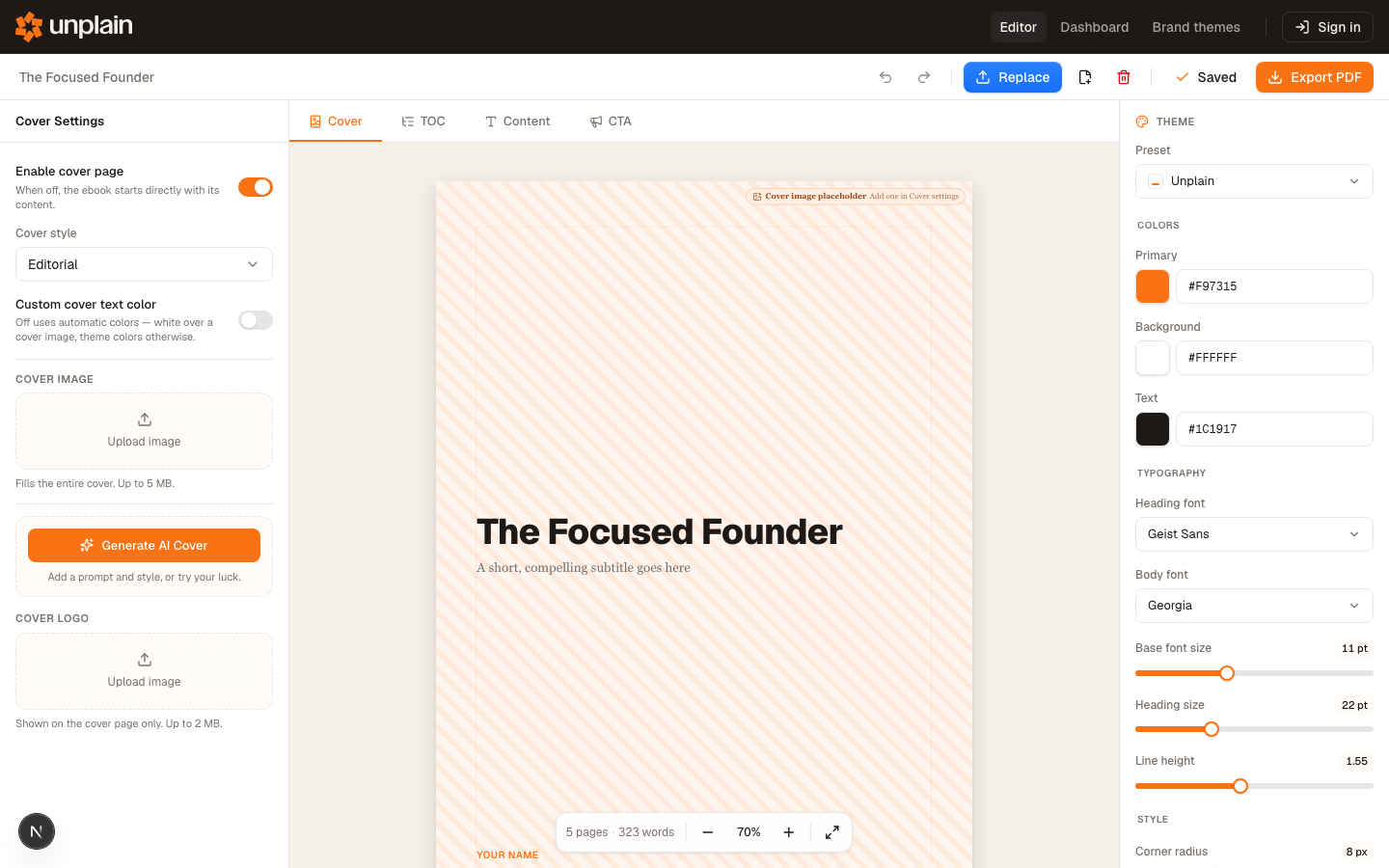 The theme panel your assistant is setting when it applies a Brand Theme: colors, fonts, sizing and spacing, all in one place.
When this is the right answer: you produce documents like this repeatedly and you want them to match. The Brand Theme is the reason. Set your colors, fonts and logo once, and every document your assistant creates afterwards inherits them, so the fifth report looks like the first without anybody re-specifying anything.
Where it stops: Unplain exports PDF only, so if you need EPUB or a Kindle file this is the wrong tool. It does not write your content and does not read your data. And if you genuinely only need one document, Route 2 is faster.
Getting consistency across a series
Whichever route you pick, the thing that makes a set of reports look professional is not any single document. It is that they match.
That means deciding once, and then not deciding again:
- Fix the brand before the first document, not after the third. Colors, typeface, logo. In Unplain this is a Brand Theme; in a scripted pipeline it is your stylesheet. Either way, write it down somewhere the next document reads from automatically.
- Give your assistant the document structure, not just the topic. “Executive summary, three findings with evidence, recommendation, appendix” produces a contents page worth having. “Write about churn” produces whatever it produces.
- Keep the source Markdown. It is the thing you edit next month. The PDF is an output, and treating it as the source is how you end up rebuilding.
- Check the first export at full length. Almost every layout problem is a pagination problem, and pagination problems only appear once the document is long enough to have page breaks in awkward places.
Which one should you use
| You are | Use |
|---|---|
| Producing one document, once | Claude’s built-in file creation |
| Running a pipeline you want in CI | A render script Claude Code writes for you |
| Generating documents from structured data | A template-based PDF API |
| Producing the same kind of document repeatedly, and it needs to look like yours | Unplain through the MCP |
If you are in the last row, the MCP quick start has the full setup for Claude Code and Codex, and it takes about ten minutes from API key to first PDF. The free plan exports documents up to five content pages, which is enough to run the whole loop before you decide anything.
Frequently asked questions
Can Claude Code create a PDF on its own?
Yes, if you give it a renderer. Claude Code can write a script that calls Pandoc, WeasyPrint or headless Chrome, and it can run that script for you. What it cannot do on its own is make consistent design decisions across documents: margins, type scale, where a table breaks, what the cover looks like. Those come from whatever stylesheet or tool you point it at.
What is the difference between this and asking Claude to make a PDF in the chat?
Claude's built-in file creation returns a finished file, which is ideal for a one-off. It does not give you a project you can reopen and edit, a saved brand that applies to the next document automatically, or a table of contents that renumbers itself when the content changes. If you produce one report, use the built-in. If you produce the same report every month, you want something with saved state.
Does the Unplain MCP cost extra?
No. The MCP server is included on every Unplain account, including the free plan, and an API key carries exactly the limits of the plan behind it. There is no separate MCP tier. On the free plan you can export documents up to 5 content pages, which is enough to test the whole loop.
Can my assistant overwrite a change I made in the web app?
No. Edits through the MCP are atomic and version-checked, so if the document changed since your assistant last read it, the edit is rejected rather than applied over your work.
Which AI clients are verified against the Unplain MCP?
Claude Code and Codex have both been driven end to end. Unplain runs a remote MCP server over HTTP, so any client that can add a remote server and send an Authorization header should work, but those two are the ones tested.